Everything you need to produce documents
Built for the repetitive and sensitive work of preparing documents for production.
Folder-tree conversion
Point Prodocere at a folder and it rebuilds the whole tree as PDFs, with the same names and the same structure. Nothing gets reshuffled.
Broad format support
Word, PowerPoint, images (including iPhone HEIC photos), text, Markdown, HTML, OpenDocument, and SVG convert to print-quality PDF. Excel files, existing PDFs, and videos pass through untouched.
Email + attachments
.eml and .msg messages render with their headers and inline images, and their attachments are converted or copied alongside.
Bates labeling
Sequential page stamps like SMITH 000001 across every file, with files and folders renamed to match their numbers, so the whole production stays in order.
Stamps, your way
Stamp Bates numbers or any custom text, like CONFIDENTIAL, and add more than one label to every page. Each label gets its own position, typeface, size, and color, on a whole folder, a single PDF, or just a page range.
One-file productions
Combine an entire production into a single Bates-numbered PDF named by its full range. Files that cannot become PDF pages are included as labeled placeholders, so the record stays complete.
Combine documents
Pick any files, put them in the order you want, and merge them into one PDF. Everything converts as it goes, and files that cannot become pages, like spreadsheets, keep their spot with a labeled placeholder page.
Remove Bates labels
Take labels back off the PDFs Prodocere stamped and restore the original file and folder names, so a subset of your claims file can go out under production numbers without whiting out the old labels and stamping over them. Prodocere only removes its own labels, and never touches your stamped originals.
Rename-only mode
Already stamp Bates numbers elsewhere? Apply just the renaming and skip the page stamps. The renaming alone saves hours on large, complex file structures.
Preview before you commit
Run a dry run to see exactly how every file and folder will be renamed and numbered before a single file changes, and stop any run at any time.
Stays on your computer
Everything happens locally, so client documents are never uploaded to a cloud service. The conversion engine is bundled right in, so there is nothing else to install. The only data we ever hold is your email and, if you subscribe, your license key.
One window, one pass
This is the entire workflow: pick a folder, click Convert, and every file becomes a clean PDF. Here it is right after finishing the sample case from the homepage.
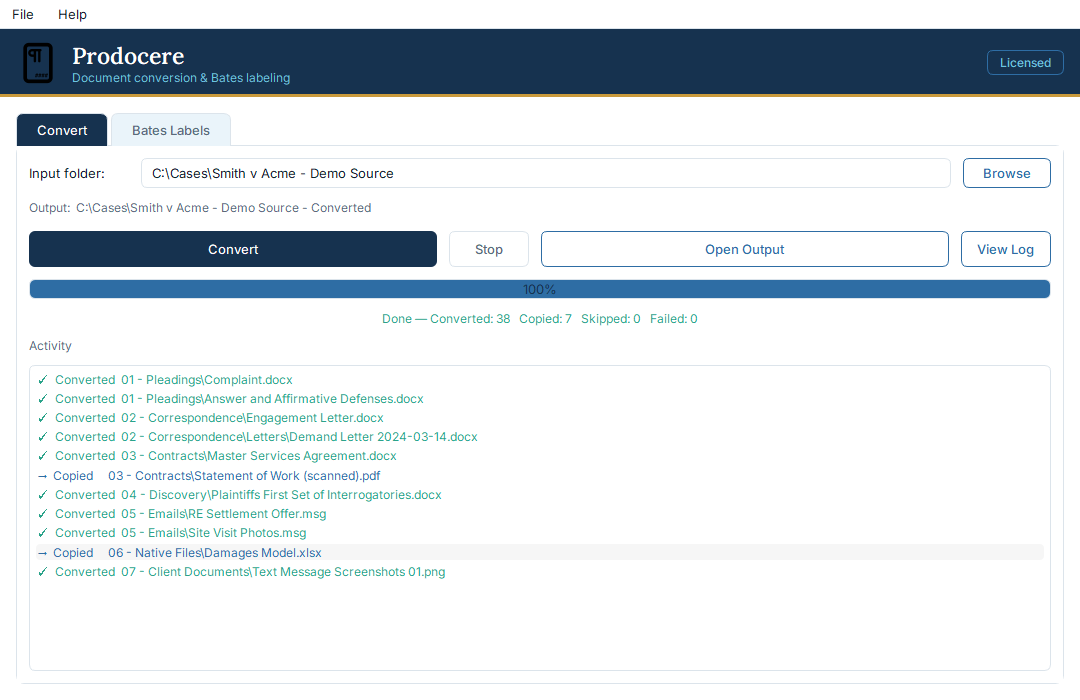
Picture the Wednesday before a deadline
Your client has just sent you a folder of hundreds of files: videos, text messages, screenshots, emails, Excel spreadsheets, Word documents, and every other difficult file type you work with day to day. The deadline is Friday.
Your paralegal is swamped with cases. You have 3 depositions lined up and a team meeting on Thursday. You have already decided everyone is going to have to work late on Friday.
With Prodocere you never have to stop your billable work to deal with the tedious process of document production. Just point it at a folder and get back to work that you can get paid for.
On the roadmap
Prodocere ships new features regularly, and this is what is in the works now. Want one sooner? Tell us.
Exhibit stamps
Place an exhibit sticker anywhere on a page, size it to fit, and type the exhibit number right on it. Colour-coded by party: blue for defendant, yellow for plaintiff, white for everything else.
PDF compression
Shrink large PDFs to a smaller file size for easier sharing and e-filing, while keeping them clear and readable.
Audio and video trimming
Trim a clip to an exact range. Drop in the file, enter a start and end time, and get back a trimmed copy saved next to the original.
What's new
Prodocere is in active development. Here is what has shipped recently.
Version 1.10.1 Latest
October 12, 2026- Fixed: Outlook .msg emails whose message text is stored only as Rich Text used to convert as the header block over "(no readable body)". The text is now rendered from the message's own Rich Text, with the From / Sent / To / Subject lines at the top.
- Fixed: message text silently dropped during conversion. A related case converted the email, header and attachments included, but with an empty body. That text now comes through, and an email that truly has no text says so in the activity log as well as on the page.
Version 1.10.0
September 8, 2026- New: naming and presets. Choose how a Bates run names files and folders — the first Bates number, the full range, with or without the original name, or leave names untouched — in the new Naming / file architecture window. Save any combination as a preset and set your own default — the default is marked in the preset list. One preset ships: Standard production.
- Your Bates naming and label settings are reset by this update. The new default names files by their first Bates number, leaves folder names alone, and produces a combined PDF and an Excel production log. Your first Bates number is kept as it was, so a production already under way carries on from where it left off. Your previous settings are saved as a preset named "Previous settings" — pick it from the preset list to get them back.
- Switching presets never changes your first Bates number either. Where a production's numbering has got to belongs to the matter, not to the naming style, so it stays where you set it until you change it yourself. A preset still remembers the number it was saved with.
- Fixed: wide emails and web pages no longer come out cut off on the right. A table wider than the page — a billing summary, an exported report, a saved web page — used to lose every column past the page edge. The page now grows just enough to hold everything, and the Convert done-line reports how many documents needed widening. Ordinary documents are unchanged.
- After a stamped run that drops original file names, the Remove tab restores PDF names automatically, since they are recorded inside the PDF itself. Non-PDF file names cannot be restored that way, and neither can anything from a rename-only run, which writes no stamp at all; recover those from "Production Log.xlsx" instead.
Version 1.9.0
August 14, 2026- New: Production Log. Numbered Bates runs now also write a "Production Log.xlsx" with your production. It lists every file's Bates range, original file name, and original location, with the total page count, Bates prefix, source folder, and full Bates range at the top. Works for folder runs, rename-only runs, combined single-PDF productions, and single-PDF stamping.
- The log is on by default and optional. Uncheck "Produce production log (Excel)" in the Bates tab's File Options to skip it. Re-running a folder never overwrites an earlier log; a new one is written alongside it.
Version 1.8.4
August 10, 2026- Fixed: some Outlook .msg emails failed to convert and produced no PDF at all. It affected emails sent with no message text, where the attachment is the whole point, which is how scanners and filing systems usually send documents. Those emails now convert, with the attachment included.
- More generally, one damaged part of an email no longer costs you the whole email. An attachment Prodocere cannot read is reported and the rest of the message still converts.
- Emails that failed before this update convert correctly if you run the folder through Convert again.
Version 1.8.3
July 24, 2026- Fixed: photos taken on a phone or camera could come out sideways or upside down when converted. Prodocere now reads the photo's stored orientation, so pictures convert exactly the way they look in your photo viewer. Converting the folder again fixes documents made before this update.
Version 1.8.2
July 24, 2026- Fixed: some JPG photos converted to a two-page PDF with the same image on both pages. This affected pictures that quietly hold more than one frame inside a single file, such as certain phone and camera photos. They now convert to a single page. Multi-page TIFFs and animated GIFs still convert one page per frame.
Version 1.8.1
July 22, 2026- Bates renaming can now leave the original file name off. Choose "DEF 000001-000005" instead of "DEF 000001-000005 - Signed Contract" for a clean, number-only production. It is a checkbox on the Bates tab, on by default so nothing changes unless you turn it off.
- When you drop the name, Prodocere keeps the original file name inside the PDF, so the Remove tab can still put the file names back. Folder names are not restored, since a folder has no PDF to hold the name.
Version 1.8.0
July 21, 2026- New Remove tab: take Bates labels back off PDFs Prodocere stamped, and give the files and folders their original names back. Useful when a subset of your claims file has to go out under production numbers, instead of whiting out the old labels and stamping over them.
- Works on a whole folder or a single PDF. By default the cleaned copies go to a new folder next to the original, so your stamped claims file is never touched.
- Prodocere only removes its own labels. Labels from another program are left alone, and a stamped PDF that has been flattened since is reported rather than partly cleaned.
- Removing labels restores the page exactly as it came in, so stamping it again gives the same result as stamping the original.
- Fixed: stamping could drop a font the page was using, which left text garbled when copied out of the stamped PDF.
Version 1.7.0
July 19, 2026- Stamp several labels on every page. Add a second label such as CONFIDENTIAL next to your Bates numbers, each with its own text, numbering, position, typeface, size, and color.
- The Combine tab now takes any file type. Files that can't become pages, like spreadsheets and videos, hold their place with a labeled placeholder page.
- RTF and plain-text files attached to emails now appear inside the converted email, the same way Word attachments do.
- Stamped pages no longer carry stray unembedded fonts brought in by the original PDF, keeping productions archival-clean.
- Fixed: the What's New window was unreadable on Macs in dark mode.
Version 1.6.2
July 16, 2026- Every page Prodocere generates now carries its fonts inside the PDF. Bates stamps, placeholder pages, and converted Markdown and log files no longer depend on the fonts installed on the reader's computer, so productions display identically everywhere and pass the font-embedding checks used by archival and court filing systems.
Version 1.6.1
July 15, 2026- Web page files (.html) no longer come out cut off. Wide pictures and tables are fitted to the page instead of running off the edge. Emails with wide tables get the same fix.
- Bates labels always land in a clear margin. Stamping a single PDF now makes room for the label, so it never prints on top of a full-page picture.
- Drag a PDF straight into the Bates tab to stamp a single file, the same way you drag a folder.
Version 1.6.0
July 10, 2026- Email conversions are much faster. Folders full of emails now finish in a fraction of the time.
- Pictures embedded in emails no longer get cut off. Large screenshots are fitted to the page, and zooming in on the PDF shows the full original detail.
- The app now updates itself on macOS too. When a new version is out, Prodocere downloads it, checks it, and opens the installer for you.
- License activation and update checks now work on office networks that inspect secure connections.
Version 1.5.0
July 8, 2026- The installer is less than half its old size. A trimmed-down conversion engine downloads and installs much faster, and the converted documents come out exactly the same.
- If the conversion engine's settings ever become damaged, Prodocere now repairs them automatically instead of quietly failing every conversion.
Version 1.4.0
July 7, 2026- New Combine tab: pick several documents in any order and merge them into one PDF. Files convert as needed, so a PDF, a Word file, an email, and a photo can all go into the same document.
- See what changed without leaving the app: What's New in the Help menu shows the version history, right from the About box too.
- Closing the app during a run now asks first, then finishes the current file cleanly.
Version 1.3.0
July 6, 2026- Conversions are much faster. Folders heavy with Word and PowerPoint files finish up to 4 times quicker.
- More file types convert to PDF: iPhone photos (HEIC), OpenDocument text and presentations, SVG images, Markdown and log files, and macro-enabled Word and PowerPoint files.
- OpenDocument spreadsheets (.ods) are copied through unchanged, alongside Excel.
Version 1.2.6
July 1, 2026- The Windows installer is now digitally signed, so Windows shows Prodocere as a verified publisher.
Version 1.2.5
June 30, 2026- Multi-page TIFF images now convert every page, not just the first.
- Plain-text emails now convert with the same clear layout as formatted emails, and attachments with periods in their names keep the correct file type.
- When two files would produce the same PDF name, both are kept and labeled by their original file type, so nothing gets overwritten.
- Fixed license activation on macOS.
Version 1.2.4
June 9, 2026- The Convert tab is simpler. Pick your folder and Prodocere puts the PDFs in a new folder named for it, right next to the original.
- Bates stamping has its own folder picker, and you choose whether to stamp your files in place or save stamped copies to a new folder.
- Fixed: dropdown menus were hard to read on macOS.
Version 1.2.3
June 8, 2026- Prodocere now updates itself. When a new version is out, the app offers to install it and handles the download for you.
- Added a macOS version (Apple Silicon), alongside Windows.
Version 1.2.2
June 8, 2026- Subscribe right from the pricing page. Checkout stays on our own site, your license key arrives by email, and you unlock the app by pasting it in.
- The free trial now starts with your email the first time you open the app.
Version 1.2.1
June 5, 2026- Combine an entire production into one Bates-numbered PDF, named by its full range. Files that are not PDFs become labeled placeholder pages.
- Skip choosing an output folder. Prodocere can create one next to your source folder, named to match.
- Fixed: long lines in plain-text emails now wrap to the page instead of being cut off.
Version 1.2.0
June 5, 2026- Stamp pages with custom text like CONFIDENTIAL, or with sequential Bates numbers. A single toggle switches between the two.
- Place the stamp in any of six positions, and set its size and color.
- Stamp a single PDF over a chosen page range, saving a new file and leaving the original untouched.
Version 1.1.0
June 3, 2026- Refreshed interface with a live activity view, drag-and-drop folders, and a settings panel.
- Rename-only mode: apply Bates names without stamping the pages.
- A new application icon.
Version 1.0.0
June 1, 2026- First release: convert an entire folder tree to PDF and apply Bates labels, all on your own computer.
- Handles Word, PowerPoint, images, text, HTML, and email with attachments.
- One Windows installer with everything bundled in, so there is nothing else to set up.
Full release notes live on GitHub .